Home health coding and QA software

AI chart review for home health. Every code shows its sentence.

ZuCoder reads the OASIS, the referral packet and the Plan of Care, suggests ICD-10 codes, and links each one to the exact words on the source page. Your coder makes the final call.

  • Reads faxes and scans
  • Every code linked to its page
  • No EMR integration to start

Referral · page 3 of 41Faxed scan

Home health referral

Assessment

Type 2 diabetes mellitus with CKD stage 3a.

Chronic obstructive pulmonary disease.

Denies chest pain. Mother had stroke.

Blood pressure: 132/78 mmHg. Pulse: 76 bpm.

Left heel wound measures 2 x 1 x 0.2 cm.

Possible pneumonia. Further evaluation is pending.

History of glaucoma H40.9.

Fictional record · no patient data

ZuCoderCoding reviewIllustrative example

Suggested codes3

Needs review1

Kept out of suggestions3

Your coder makes the final call.Coding list E11.22 · primary

Try it. Select a finding to see the words it came from.Example only · no patient data · no model call

Review any visit

  • Start of care
  • Resumption of care
  • Recertification
  • Skilled nursing
  • Discharge
  • Transfer
  • Therapy
4
OASIS-E2 time points reviewed: SOC, ROC, Recert and follow-up
9
PDFs per chart: the OASIS and eight supporting records, including the Plan of Care
2
reading methods: digital text, and OCR for scans and faxes
100%
of coding decisions made and saved by your own coder

No accuracy percentage here. We publish one when a pilot has measured it. How a pilot works

How it works

From a stack of PDFs to a defensible review.

ZuCoder prepares the chart so your coders spend their time on judgment, not on hunting through pages.

  1. Extract every page

    Upload the OASIS and up to eight supporting PDFs, such as the referral and Plan of Care. ZuCoder reads digital text, runs OCR on scans and faxes, and tells you which pages need a look.

  2. Review with the source open

    Search the whole chart, compare the form with the referral, and open any passage on its original page with the words highlighted.

  3. Code with evidence

    Get candidate ICD-10-CM codes with the supporting words and rule warnings. Your coder accepts, rejects or edits, then sets the primary diagnosis and order.

OASIS, Plan of Care and discharge

OASIS (SOC, ROC, RCT, SCIC, Discharge) review.

Upload the OASIS-E2 from your EMR with the patient’s referral, discharge summary and Plan of Care. ZuCoder checks the diagnoses on the OASIS against those records, using the rules that fit each timepoint.

  • SOC

    Start of care

    Evidence comes fromReferral packet, hospital and provider records

    • Diagnoses on the SOC OASIS are checked against the referral
    • Codes printed on the OASIS without independent support are flagged
    • Your coder sets the primary diagnosis and the order
  • ROC

    Resumption of care

    Evidence comes fromHospital discharge records first, then other records

    • Warns you when no hospital discharge record is attached
    • Prior OASIS codes are shown as history, never carried forward
    • Confirm what still applies after the hospital stay
  • RCT

    Recertification

    Evidence comes fromUpdated provider documentation, orders and plan of care

    • Prior OASIS sits beside the current records as history only
    • No assumption that diagnoses are unchanged
    • Orders for the new certification period are part of the evidence
  • SCICPartly planned

    Other follow-up (RFA 5)

    Evidence comes fromCurrent orders and provider notes

    • Formerly called SCIC; still required after an unexpected major change
    • Diagnoses are checked against the latest supporting records
    • Dedicated follow-up rules are planned, not yet built

On SOC, ROC, Recert, transfer and discharge OASIS, ZuCoder adds a reminder to verify each OASIS item answer against the form. It does not answer M-items or GG-items for you. Read the OASIS review guide

Plan of Care (POC)

The Plan of Care is part of the evidence.

Medicare requires a Plan of Care for every home health episode, usually on the CMS-485 form. Signed by the physician, it authorizes and directs every visit: the diagnoses, the disciplines and how often they visit, the medications, the goals, and why the patient is homebound and needs skilled care. It is how the agency shows Medicare the care is reasonable and necessary, so its diagnoses have to agree with the OASIS.

Attach the Home Health Certification and Plan of Care (CMS-485) with the OASIS. ZuCoder recognises plan-of-care pages by their certification period, orders, and frequency and duration, and treats the POC as an independent record. A diagnosis written on the POC opens on its page with the words highlighted, just like the referral.

ZuCoder gives your coder review prompts, not automatic answers. Automatic alerts when the OASIS, POC and orders disagree are on the roadmap.

Read the Plan of Care guide

What a Plan of Care covers, and how ZuCoder helps

  • Diagnoses being treated

    Each diagnosis on the POC opens on its page, and Compare OASIS shows whether the OASIS lists the same codes.

  • Medications

    A prompt to reconcile the medication list with the orders. A drug alone never becomes a diagnosis.

  • Disciplines, frequency and duration

    Who visits, how often and for how long. Find any of it on the page with the chart assistant.

  • Interventions and goals

    A prompt to check that the visits document skilled care, the patient’s response and the plan for the next visit.

  • Homebound and skilled-need justification

    A prompt to check that the skilled need is documented, with the source page open beside it.

  • Physician signature and dates

    A prompt to verify dates, credentials and signatures on the original page. A signature shape alone is never treated as proof.

OASIS-E2 discharge review

Discharge is where your outcomes are measured.

Under Home Health Value-Based Purchasing (HHVBP), OASIS-based measures make up a large part of an agency’s Total Performance Score, and many of them compare the patient at start of care with the patient at discharge. If the SOC assessment understates what the patient needs, real progress can look like no progress by discharge. That can pull down star ratings and, over time, referrals. Both ends of the episode have to be right.

  • Choose Discharge as the form and attach the SOC or ROC OASIS as a prior OASIS. It sits beside the discharge as history, never as evidence.
  • Diagnoses on the discharge OASIS are checked against the visit notes, orders and other supporting records.
  • Items to check include verifying each OASIS answer against the form, reconciling medications, wound measurements and units, and dates and signatures.
  • ZuCoder does not score function or predict VBP results. Your reviewer decides every answer.
Read the discharge and HHVBP guide

Hospice

Planned

Hospice chart review is coming next.

Hospice follows different rules from home health, so we will not present home health checks as hospice checks. Hospice-specific review is on our roadmap. Today you can upload hospice records as an other form and use ZuCoder’s source-linked search and diagnosis evidence, with your reviewer applying the hospice rules.

  • Comfort, not cure

    Care for a person with a terminal illness that focuses on comfort rather than treating the illness itself.

  • Pain and symptom control

    Often called palliative care: managing pain and symptoms so the patient is as comfortable as possible.

  • Support for patient and family

    Emotional and spiritual support for the patient, and respite care that gives the family a break.

  • A team of professionals

    Physicians, nurses, aides, social workers and spiritual counsellors working together.

Product tour

See the real workspace.

Six screens from the working product, captured with a fictional chart. No patient data is shown.

Get the reviewer guide
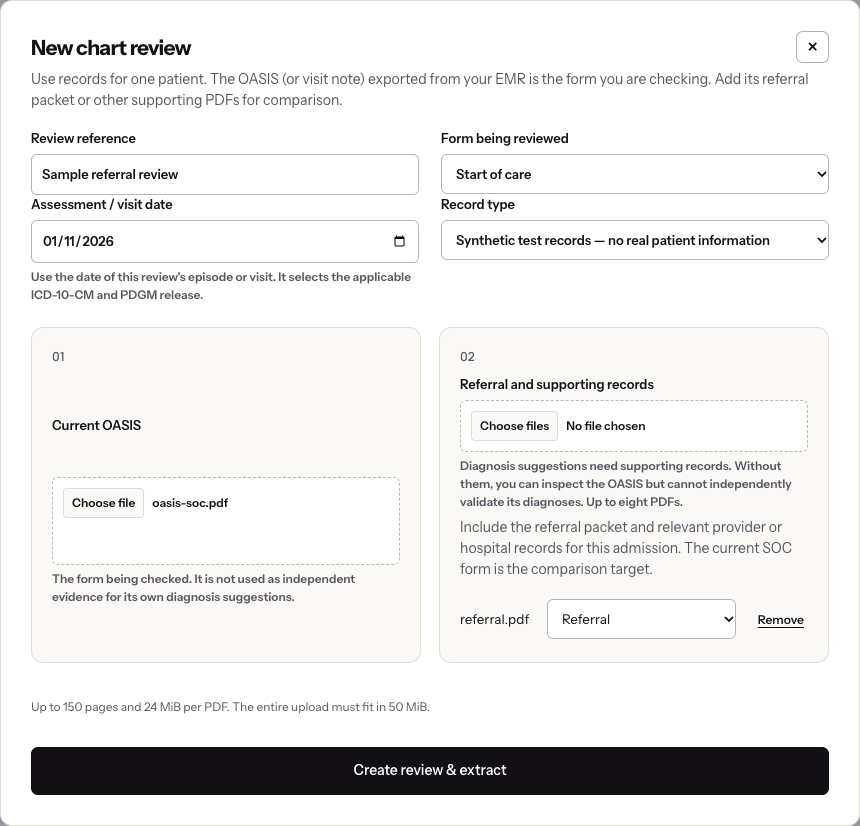
ZuCoder · New chart review
New chart review form with separate file inputs for the current OASIS and supporting records.
  • Choose the visit form
  • OASIS and supporting PDFs

Screen 1 of 6

Bring the records together

Add the current OASIS exported from your EMR, then attach the referral, discharge summary, Plan of Care or other supporting PDFs for the same patient.

Fictional chart. No patient data.

Bring the records together

New chart review form with separate file inputs for the current OASIS and supporting records.

Why ZuCoder

Built for the reviewer who has to defend the code.

ZuCoder makes every code on the chart easy to check, by the coder today and by anyone who asks later.

  • The form cannot be its own proof

    The OASIS under review stays separate from the referral, discharge summary and Plan of Care, so a diagnosis needs support from an independent record.

  • Every suggestion shows its work

    Each candidate code opens the original page with the supporting words highlighted.

  • It reads the fax, not just the fields

    OCR runs on scanned and faxed pages, and pages it could not read confidently are flagged, not skipped.

  • Context decides, not keywords

    Negation and family history are labelled, and those mentions stay out of the suggested codes.

  • No integration project to start

    Export the OASIS from your EMR as a PDF and upload it. No API, interface build or EMR changes.

  • Your coder stays in charge

    ZuCoder does not auto-code. The coder accepts, rejects or edits each candidate and saves the decision with its evidence.

Reviewing a home health chart by hand, and with ZuCoder
The taskBy handWith ZuCoder
Finding the supporting sentenceScroll and search across 40+ pagesOne click opens the page with the words highlighted
Scanned and faxed referralsRead by eye, page by pageOCR on every scan, with unreadable pages flagged
Checking the OASIS against the referralTwo windows and memoryOASIS and supporting records kept separate and compared
Reading the Plan of CareA separate PDF, read line by lineCMS-485 pages recognised and used as evidence
Family history and negated mentionsEasy to miss under time pressureLabelled by context and kept out of suggestions
Coding-rule conflictsLooked up from memory or a manualRule warnings shown beside the candidate code
Handing a chart to another reviewerNotes in email or a spreadsheetFinding, note and source page saved with the chart
Who makes the coding decisionThe coderStill the coder, every time

For agencies and coding teams

Prove it on your own charts first.

A specialist pilot shows how ZuCoder performs on the records your team actually receives, so you do not have to trust a headline number.

A coder at a kitchen desk reading a printed page beside an open laptop.
  1. Choose your charts

    Pick OASIS assessments with their referral packets and Plans of Care across the visits you handle, including faint faxes and awkward measurements.

  2. Record the expected answer

    Your specialist notes the expected passage, page and code before opening ZuCoder, so the comparison is fair.

  3. Measure the difference

    Compare ZuCoder against that reference: missed findings, unnecessary suggestions and review time.

  • Agency owners and administrators

    See which charts are waiting, in progress or complete, and who owns each one.

  • QA and coding leads

    Reopen any finding and see the exact passage the coder relied on.

  • Coders and OASIS reviewers

    Start from candidates with evidence, and spend your time on the judgment calls.

  • Coding and QA service companies

    Keep each client agency in its own workspace, with its own coders, charts and saved decisions.

Handling clinical documents

Careful with the chart by design.

Before any real charts are used, we agree retention, access and the required agreements with your agency.

  • OCR runs on ZuCoder’s own hosting

    Scanned pages are not sent to an outside OCR service.

  • Access follows the agency and the role

    A coder sees assigned charts. An owner sees their agency.

  • Every coding decision is recorded

    Codes, notes and order are saved with a revision history.

  • No patient data on this website

    Examples use fictional records, and the public site has no upload facility.

No surprises

What works today, and what is coming.

We keep the line between the two clear, so you always know what you are evaluating.

Available today

  • PDF upload of the OASIS, referral, Plan of Care and other records
  • OASIS review rules for SOC, ROC, Recert and discharge
  • Text and OCR extraction with scan-quality flags
  • ICD-10-CM candidates with source evidence and rule warnings
  • Chart assistant search with page links
  • Saved coding decisions, notes, roles and assignment

Being validated in pilots

  • Specialist-coded benchmark on agency charts
  • Measured review time and missed-finding rates

Planned next

  • Direct EMR import and reviewer-approved write-back
  • OASIS M-item and GG-item review
  • Dedicated other follow-up (RFA 5) review rules
  • Hospice chart review
  • Automatic OASIS, Plan of Care and orders consistency alerts

Straight answers

Questions agencies ask us.

Including what ZuCoder does not do yet.

Is ZuCoder an auto-coder?

No. ZuCoder prepares the chart and proposes candidate ICD-10-CM codes with their evidence. A person reviews every candidate, and nothing is saved as a coding decision until your coder saves it.

How does ZuCoder show where an ICD-10 code came from?

Every candidate code carries a link to its evidence. Selecting it opens the original page of the referral, discharge summary or order with the supporting words highlighted, so the reviewer can read the heading, the date and the sentence around it.

Does it replace our coders, QA staff or coding vendor?

No. It removes the searching, cross-checking and page-flipping so your existing reviewers can spend their time on judgment. ZuCoder is software your own coders use; the reviewer remains accountable for the final review.

Do you publish an accuracy percentage?

Not yet, and we will not quote one we have not measured. Accuracy depends on the records an agency actually receives, so we measure it in a specialist pilot against a coder’s reference and share the counts with you.

Which EMRs does ZuCoder work with?

ZuCoder starts from a PDF, so it does not depend on a particular EMR. Export the OASIS under review as a PDF and attach the supporting records. The agency enters approved changes in its EMR. Direct import and write-back are planned for a later phase.

Can it read faxed and scanned referral packets?

Yes. ZuCoder reads embedded text on digital pages and uses optical character recognition (OCR) for scans and faxes. Some pages use both. The extraction results identify the method and flag uncertain or unreadable pages so the reviewer can inspect the original image.

How does it handle negated, family-history or uncertain diagnoses?

ZuCoder labels each diagnosis mention by its context. A denied symptom, a relative’s condition or a diagnosis still being evaluated is kept out of the suggested codes. The mention stays visible with its source, so the reviewer can check it.

Does it check coding rules and PDGM?

The coding workspace shows applicable coding-rule warnings and PDGM diagnostic screens beside the candidate codes. They are review prompts. The coder chooses the primary diagnosis and the order.

Why does ZuCoder keep the OASIS separate from the referral?

Because the form under review should not be evidence for itself. Diagnosis suggestions come from the supporting records, such as the referral and discharge summary. Codes printed on the OASIS are shown as a comparison, so you can see what is supported and what is not.

Which OASIS timepoints can we review?

Start of care (SOC), resumption of care (ROC), recertification (Recert) and other follow-up (RFA 5, formerly called SCIC), plus transfer and discharge OASIS-E2 and skilled nursing and therapy visit notes. SOC, ROC and Recert have their own source rules: for example, ROC looks for the hospital discharge records first, and prior OASIS codes are shown as history only. Other follow-up is reviewed today with the general rules; dedicated follow-up rules are planned.

Do you review OASIS-E2 discharge assessments?

Yes. Choose Discharge as the form and attach the SOC or ROC OASIS as a prior OASIS, which stays beside the discharge as history only. ZuCoder checks the diagnoses on the discharge OASIS against the supporting records and lists items to check, such as verifying each OASIS answer against the form and reconciling medications. It does not score function or predict Value-Based Purchasing results.

Does ZuCoder support hospice?

Not yet. Hospice follows different rules from home health, and hospice-specific review is on our roadmap. Today you can upload hospice records as an other form and use source-linked search and diagnosis evidence, with your reviewer applying the hospice rules.

Does ZuCoder read the Plan of Care?

Yes. Upload the Home Health Certification and Plan of Care (CMS-485) as a supporting record. ZuCoder recognises plan-of-care pages, uses them as independent evidence for diagnosis suggestions, and adds review prompts such as confirming each diagnosis affects the plan of care and reconciling medications and orders. Automatic alerts when the OASIS and the Plan of Care disagree are planned.

Can it recommend an OASIS answer?

Not in this release. The coding workspace presents candidate ICD-10-CM codes, their source evidence and applicable rule warnings. Automated OASIS M-item and GG-item answers need separate specialist validation and are on the roadmap.

What does the AI do today?

ZuCoder extracts text and word positions, flags scan-quality issues, and maps diagnosis mentions to candidate ICD-10-CM codes. Coding rules and context checks help organise the review. The chart assistant retrieves source passages; optional model verification depends on the workspace configuration. The coder validates the evidence and decides what to use.

Which files can I upload?

Choose the current OASIS (or visit note) in PDF format, exported from your EMR. Add up to eight supporting PDFs for the same patient. These can include a faxed referral, discharge summary, Plan of Care and orders, a prior OASIS, or prior visit notes.

Where is patient data processed?

The extraction worker runs on the infrastructure hosting ZuCoder. In the current release, OCR runs locally and chart search reads stored passages. Access to an original PDF, page image, or saved decision follows the review’s agency and the signed-in user’s permissions. Retention, access and the required agreements are settled with your agency before any real chart is used.

Can I ask a question about the chart?

Search for a term such as blood pressure or a printed ICD-10 code. The chart assistant returns matching passages with source links. You can narrow the search to the current form or a supporting document.

How do we get started?

Book a demo on sample documents. If it fits, we plan a pilot together: you choose a set of charts, a specialist records the expected answers, and we compare the results together.

Already invited to a pilot?

Your pilot coordinator sends a secure sign-in link and your individual account details. If you have not received them, contact the person who invited you.

Website data & privacy

This public website is separate from the private chart-review workspace. It has no patient upload facility. Hosting providers process technical request information to serve and protect the site.

Visitor analytics is not enabled in this release. We do not use advertising pixels or session recordings.

These notes cover this public website. Access, retention, and handling of agency records are governed separately for a clinical pilot.